
New functionality
When calculating mileage distances, we can now exclude ferry transports. The feature is controlled with a feature-flag and the default setting is to exclude ferries, since the car/vehicle is not moving while being transported on the ferry.
Personal ID validation has been improved to support more countries. If strict validation is enabled, we now validate:
- Danish CPR
- Dutch BSN
- Finnish henkilötunnus
- French NIR
- German Steueridentifikationsnummer
- Italian Codice Fiscale
- Norwegian fødselsnummer
- Spanish DNI/NIE
- Swedish personnummer
In addition to the syntax and checksum validation, we always check for duplicates (even if strict validation is disabled).
For Admins - If a user adds attachments to mileage and per diem, we have added the ability to view these in the Report view. Administrators can also add or remove attachments directly within the Report view.
-1.png?width=400&height=159&name=image%20(2)-1.png)
If Swish (or some other recipient that reauires extra validation) is configured in the organisation but not activley used, we no longer reauire the full validation. By disabling Swish in the “matrix”, or controlling with dimensions, you can process reports without having to have a verified Swish configuration.
End user - Mobile apps and new web interface
-
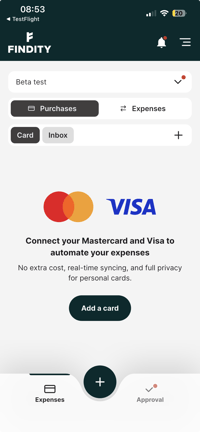
Improved onboarding and empty states for Mastercard & Visa under Purchases
-
Approval improvements
- open next approval item in the list automatically
- view previously rejected expenses in approval view
.webp?width=200&height=433&name=image%20(1).webp)
- Automatically show receipt photo preview next to expense fields during approval and in submitted states for the employee.
- Minor camera improvements with tap to focus while taking receipt photo.
- Accessibility improvements with improved readability of field descriptions placed above the fields.
.webp?width=200&height=433&name=image%20(2).webp)
-
General bug fixes and minor improvements